Stop guessing which AI skills actually matter for remote work.
Learn the 7 workflows that VAs, freelancers, admins, and remote job seekers are using to deliver faster, communicate better, and stand out — without the hype.
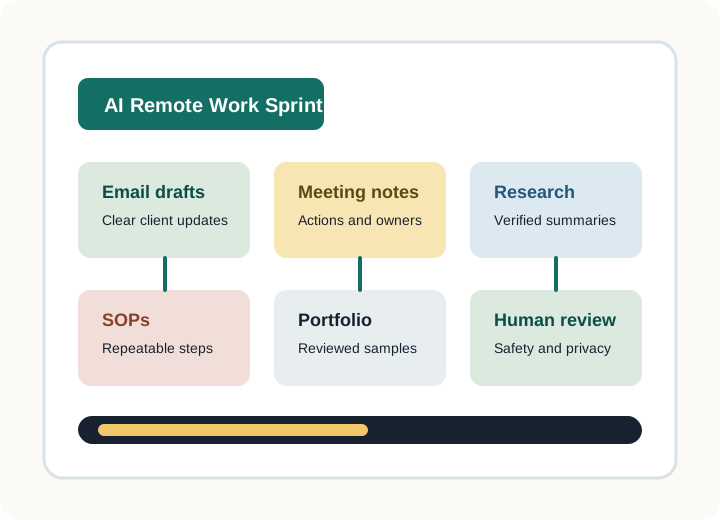
7 workflows
Templates included
Sound familiar?
These frustrations keep remote workers stuck.
You know AI could help — but generic courses don't teach the tasks you actually do.
"I need to look more capable to clients but I don't know which AI skills matter."
— Virtual assistants
📋"I want to use AI at work but I'm worried about making mistakes with sensitive info."
— Remote admins
🎯"I want templates I can use right away — not a long, expensive AI course."
— Freelancers
🚀"I want proof of practical AI skills to stand out in my job search."
— Remote job seekers
The difference
Here's what changes when you learn the right workflows.
Without AI workflows
- ✗ Spending 30+ minutes on routine emails
- ✗ Meeting notes scattered across apps and notepads
- ✗ Clients asking for that SOP you never documented — again
- ✗ Job applications that sound generic
- ✗ Worried about pasting private info into AI tools
With MyDigitalWork
- ✓ Client emails drafted in 5 minutes, reviewed in 2
- ✓ Meeting notes auto-organized with owners and deadlines
- ✓ SOPs documented once, reused forever
- ✓ Portfolio-ready samples that show real skills
- ✓ A responsible AI checklist you use before every task
What you'll learn
Useful workflows, not AI theory.
Every workflow comes with prompts, review steps, and a clear deliverable you can use right away.
Emails & client updates
Draft polished messages and follow-ups in minutes, with review steps built in.
Meeting notes & action items
Turn messy calls into organized summaries with owners and deadlines.
SOPs & process docs
Document repeatable tasks so clients and teams can follow them.
Research & fact-checking
Create reviewed summaries without blindly trusting AI outputs.
Job-search support
Responsible AI help for applications, prep, and portfolio artifacts.
Portfolio-ready samples
Build work samples you can show to clients and employers.
Start with 5 workflows — free.
Get starter prompts, a privacy checklist, and a short worksheet to decide what to automate first.
Go further
AI Remote Work Certificate Sprint
Learn 7 practical AI workflows, get templates, complete quizzes, build a small AI work portfolio, and earn a MyDigitalWork completion certificate.
- ✓ 7 lessons with hands-on practice
- ✓ Copy/paste templates for real tasks
- ✓ Short quizzes to check understanding
- ✓ Portfolio-ready capstone project
- ✓ MyDigitalWork completion certificate
What's included
Everything you need for $205+ in value
Total value: $205+
Beta: $29
🔒 7-day satisfaction guarantee
Why this is different
Built for remote-work tasks, not AI theory.
| Feature | Generic AI courses | MyDigitalWork |
|---|---|---|
| Focus | Broad AI concepts | Remote-work tasks you do daily |
| Deliverables | Theory quizzes | Real work samples & portfolio |
| Length | 10–40+ hours | ~5 hours across 7 lessons |
| Templates | Rarely included | Copy/paste for every workflow |
| AI Safety | Brief mention | Built into every lesson |
| Price | $99–$499+ | Beta: $29 |
Responsible AI
Use AI as an assistant — not a replacement for your judgment.
Most AI courses skip safety. Every MyDigitalWork lesson includes a review step and teaches learners to protect private information.
Join 50+ early learners
Remote workers building practical AI skills
Your first AI workflow is 15 minutes away.
Start with the free starter kit, or jump straight to the certificate sprint.
Training one person? Start with the sprint.
Training a team? Let's talk.
The team version is planned for small remote teams and VA agencies that need shared workflows, manager checklists, and responsible AI guidelines.